

Introduction
Welcome to the Service4U Whatsapp API! This documentation contains API for messaging using our Whatsapp API.
We have language bindings in Shell. You can view code examples in the dark area to the right.
Sending Free-Form Messages
You can use the API to send the following free-form messages types:
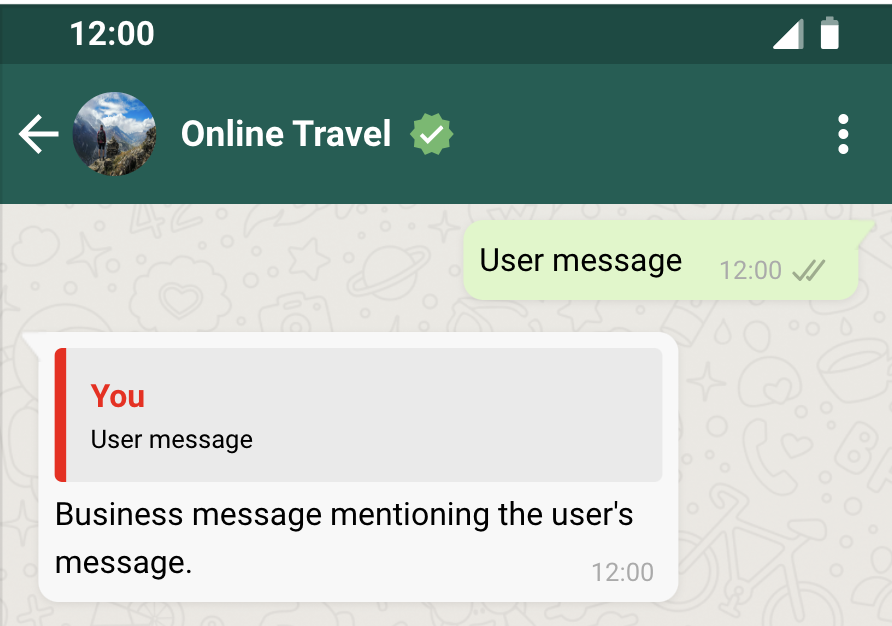
All of these message types, except for reaction messages, can be designated as a reply, which causes the delivered message to appear along with a contextual bubble displaying the content of the message that you are replying to.
Request Syntax
Use the POST WhatsApp Business Phone Number > Messages endpoint to send free-form messages to customers:
POST http://example.com/<WHATSAPP_BUSINESS_PHONE_NUMBER>/messages
Post body
{
  "messaging_product": "whatsapp",
  "recipient_type": "individual",
  "to": "<TO>",
  "type": "<TYPE>",

  /* TEXT MESSAGES ONLY */
  "text": {<TEXT>}

  /* REACTION MESSAGES ONLY */
  "reaction": {<REACTION>}

  /* MEDIA MESSAGES ONLY. FOR EXAMPLE, FOR IMAGE MEDIA: */
  "image": {<IMAGE>}

  /* LOCATION MESSAGES ONLY */
  "location": {<LOCATION>}

  /* CONTACTS MESSAGES ONLY */
  "contacts": {<CONTACTS>}

  /* INTERACTIVE MESSAGES ONLY */
  "interactive": {<INTERACTIVE>}
}
All free-form send message requests use the following object format.
Properties
| Placeholder | Description | Sample Value |
|---|---|---|
| <TO> String |
The WhatsApp ID or phone number of the customer to send the message to. See Phone Number Formats | +16315551234 |
| <TYPE> String |
Indicates message type. | text |
| <TEXT> Object |
Text messages contents. | See Text Messages. |
| <REACTION> Object |
Reaction message contents. | See Reaction Messages. |
| <IMAGE> Object |
Media message contents. The property name should match the type of media message you are sending (image for an image message, video for a video message, etc.). | See Media Messages. |
| <LOCATION> Object |
Location message contents. | See Location Messages. |
| <CONTACTS> Object |
Contacts message contents. | See Contacts Messages. |
| <INTERACTIVE> Object |
Interactive message contents. | See Interactive Messages. |
The examples throughout this document describe the post body payload requirements for each of the free-form message types.
Response Syntax
{
  "messaging_product": "whatsapp",
  "contacts": [
    {
      "input": "<INPUT>",
      "wa_id": "<WA_ID>"
    }
  ],
  "messages": [
    {
      "id": "<ID>"
    }
  ]
}
Upon sucess the API will respond with:
Response Properties
| Placeholder | Description | Sample Value |
|---|---|---|
| <INPUT> String |
The customer phone number that the message was sent to. This may not match wa_id. | +16315551234 |
| <WA_ID> String |
WhatsApp ID of the customer who the message was sent to. This may not match input. | +16315551234 |
| <ID> String |
WhatsApp message ID. You can use the ID listed after "wamid." to track your message status. | wamid.HBgLMTY1MDM4Nzk0MzkVAgAR GBI3N0EyQUJDMjFEQzZCQUMzODMA |
Phone Number Formats
Plus signs (+), hyphens (-), parenthesis ((,)), and spaces are supported in send message requests.
We highly recommend that you include both the plus sign and country calling code when sending a message to a customer. If the plus sign is omitted, your business phone number's country calling code is prepended to the customer's phone number. This can result in undelivered or misdelivered messages.
For example, if your business is in India (country calling code 91) and you send a message to the following customer phone number in various formats:
| Number In Send Message Request | Number Message Delivered To | Outcome |
|---|---|---|
| +16315551234 | +16315551234 | Correct number |
| +1 (631) 555-1234 | +16315551234 | Correct number |
| (631) 555-1234 | +916315551234 | Potentially wrong number |
| 1 (631) 555-1234 | +9116315551234 | Potentially wrong number |
Text Messages
Sample request:
curl -X  POST \
'https://graph.facebook.com/v17.0/FROM_PHONE_NUMBER_ID/messages' \
-H 'Authorization: Bearer ACCESS_TOKEN' \
-H 'Content-Type: application/json' \
-d '
    {
      "messaging_product": "whatsapp",
      "recipient_type": "individual",
      "to": "PHONE_NUMBER",
      "type": "text",
      "text": { // the text object
        "preview_url": false,
        "body": "MESSAGE_CONTENT"
        }
    }'
If you would like to add preview URL, add the preview_url field:
curl -X  POST \
 'https://graph.facebook.com/v17.0/FROM_PHONE_NUMBER_ID/messages' \
 -H 'Authorization: Bearer ACCESS_TOKEN' \
 -H 'Content-Type: application/json' \
 -d '{
  "messaging_product": "whatsapp",
  "recipient_type": "individual",
  "to": "PHONE_NUMBER",
  "type": "text",
  "text": { // the text object
    "preview_url": true,
    "body": "Message content including a URL begins with https:// or http://"
  }
}'
To send a text message, make a POST call to /PHONE_NUMBER_ID/messages and attach a message object with type=text. Then, add a text object.
Example:
{
  "messaging_product": "whatsapp",
  "contacts": [{
      "input": "PHONE_NUMBER",
      "wa_id": "WHATSAPP_ID",
    }]
  "messages": [{
      "id": "wamid.ID",
    }]
}
A successful response includes an object with an identifier prefixed with wamid. Use the ID listed after wamid to track your message status.
Reaction Messages
Sample request:
curl -X  POST \
 'https://graph.facebook.com/v17.0/FROM_PHONE_NUMBER_ID/messages' \
 -H 'Authorization: Bearer ACCESS_TOKEN' \
 -H 'Content-Type: application/json' \
 -d '{
  "messaging_product": "whatsapp",
  "recipient_type": "individual",
  "to": "PHONE_NUMBER",
  "type": "reaction",
  "reaction": {
    "message_id": "wamid.HBgLM...",
    "emoji": "\uD83D\uDE00"
  }
}'
To send reaction messages, make a POST call to /PHONE_NUMBER_ID/messages and attach a message object with type=reaction. Then, add a reaction object.
Example:
{
  "messaging_product": "whatsapp",
  "contacts": [{
      "input": "PHONE_NUMBER",
      "wa_id": "WHATSAPP_ID",
    }]
  "messages": [{
      "id": "wamid.ID",
    }]
}
If the message you are reacting to is more than 30 days old, doesn't correspond to any message in the conversation, has been deleted, or is itself a reaction message, the reaction message will not be delivered and you will receive a webhook with the code 131009.
A successful response includes an object with an identifier prefixed with wamid. Use the ID listed after wamid to track your message status.
Media Messages
Sample request using image with link:
curl -X  POST \
 'https://graph.facebook.com/v17.0/FROM-PHONE-NUMBER-ID/messages' \
 -H 'Authorization: Bearer ACCESS_TOKEN' \
 -H 'Content-Type: application/json' \
 -d '{
  "messaging_product": "whatsapp",
  "recipient_type": "individual",
  "to": "PHONE-NUMBER",
  "type": "image",
  "image": {
    "link" : "https://IMAGE_URL"
  }
}'
Use the POST WhatsApp Business Phone Number > Messages endpoint to send a media message. Use the type property to indicate the media asset's type (audio, document, image, sticker, or video) and either the id or link property to indicate its ID (which you must generate) or location on your public server.
If using id, you must first upload your media asset to our servers and capture the returned media ID. If using link, your asset must be on a publicly accessible server or the message will fail to send.
Media assets can be cached. See Media HTTP Caching.
Sample request using media ID:
curl -X  POST \
 'https://graph.facebook.com/v17.0/FROM-PHONE-NUMBER-ID/messages' \
 -H 'Authorization: Bearer ACCESS_TOKEN' \
 -H 'Content-Type: application/json' \
 -d '{
  "messaging_product": "whatsapp",
  "recipient_type": "individual",
  "to": "PHONE-NUMBER",
  "type": "image",
  "image": {
    "id" : "MEDIA-OBJECT-ID"
  }
}'
Example
{
  "messaging_product": "whatsapp",
  "contacts": [{
      "input": "PHONE_NUMBER",
      "wa_id": "WHATSAPP_ID",
    }]
  "messages": [{
      "id": "wamid.ID",
    }]
}
A successful response includes an object with an identifier prefixed with wamid. If you are using a link to send the media, please check the callback events delivered to your Webhook server whether the media has been downloaded successfully.
Media HTTP Caching
Cache-Control: <CACHE_CONTROL>
Last-Modified: <LAST_MODIFIED>
ETag: <ETAG>
The Cloud API supports media HTTP caching. If you are using a link (link) to a media asset on your server (as opposed to the ID (id) of an asset you have uploaded to our servers), you can instruct us to cache your asset for reuse with future messages by including the headers below in your server response when we request the asset. If none of these headers are included, we will not cache your asset.
Cache-Control
The Cache-Control header tells us how to handle asset caching. We support the following directives:
- max-age=n: Indicates how many seconds (n) to cache the asset. We will reuse the cached asset in subsequent messages until this time is exceeded, after which we will request the asset again, if needed. Example: Cache-Control: max-age=604800.
- no-cache: Indicates the asset can be cached but should be updated if the Last-Modified header value is different from a previous response. Requires the Last-Modified header. Example: Cache-Control: no-cache.
- no-store: Indicates that the asset should not be cached. Example: Cache-Control: no-store.
- private: Indicates that the asset is personalized for the recipient and should not be cached.
Last-Modified
Indicates when the asset was last modified. Used with Cache-Control: no-cache. If the Last-Modified value is different from a previous response and Cache-Control: no-cache is included in the response, we will update our cached version of the asset with the asset in the response. Example: Date: Tue, 22 Feb 2022 22:22:22 GMT.
ETag
Sample Response with Headers
HTTP/1.1 200 OK
Content-Type: image/png
Content-Length: 1024
Date: Tue, 22 Feb 2022 22:22:22 GMT
ETag: "33a64df5"
Cache-Control: max-age=604800

<IMAGE_PAYLOAD>
The ETag header is a unique string that identifies a specific version of an asset. Example: ETag: "33a64df5". This header is ignored unless both Cache-Control and Last-Modified headers are not included in the response. In this case, we will cache the asset according to our own, internal logic (which we do not disclose).
Location Messages
Sample request:
curl -X  POST \
 'https://graph.facebook.com/v17.0/FROM_PHONE_NUMBER_ID/messages' \
 -H 'Authorization: ACCESS_TOKEN' \
 -H 'Content-Type: application/json' \
 -d '{
  "messaging_product": "whatsapp",
  "to": "PHONE_NUMBER",
  "type": "location",
  "location": {
    "longitude": LONG_NUMBER,
    "latitude": LAT_NUMBER,
    "name": LOCATION_NAME,
    "address": LOCATION_ADDRESS
  }
}'
To send location messages, make a POST call to /PHONE_NUMBER_ID/messages and attach a message object with type=location. Then, add a location object.
Example:
{
  "messaging_product": "whatsapp",
  "contacts": [{
      "input": "PHONE_NUMBER",
      "wa_id": "WHATSAPP_ID",
    }]
  "messages": [{
      "id": "wamid.ID",
    }]
}
A successful response includes an object with an identifier prefixed with wamid. Use the ID listed after wamid to track your message status.
Contacts Messages
Sample request:
curl -X  POST \
 'https://graph.facebook.com/v17.0/FROM_PHONE_NUMBER_ID/messages' \
 -H 'Authorization: ACCESS_TOKEN' \
 -H 'Content-Type: application/json' \
 -d '{
  "messaging_product": "whatsapp",
  "to": "PHONE_NUMBER",
  "type": "contacts",
  "contacts": [{
      "addresses": [{
          "street": "STREET",
          "city": "CITY",
          "state": "STATE",
          "zip": "ZIP",
          "country": "COUNTRY",
          "country_code": "COUNTRY_CODE",
          "type": "HOME"
        },
        {
          "street": "STREET",
          "city": "CITY",
          "state": "STATE",
          "zip": "ZIP",
          "country": "COUNTRY",
          "country_code": "COUNTRY_CODE",
          "type": "WORK"
        }],
      "birthday": "YEAR_MONTH_DAY",
      "emails": [{
          "email": "EMAIL",
          "type": "WORK"
        },
        {
          "email": "EMAIL",
          "type": "HOME"
        }],
      "name": {
        "formatted_name": "NAME",
        "first_name": "FIRST_NAME",
        "last_name": "LAST_NAME",
        "middle_name": "MIDDLE_NAME",
        "suffix": "SUFFIX",
        "prefix": "PREFIX"
      },
      "org": {
        "company": "COMPANY",
        "department": "DEPARTMENT",
        "title": "TITLE"
      },
      "phones": [{
          "phone": "PHONE_NUMBER",
          "type": "HOME"
        },
        {
          "phone": "PHONE_NUMBER",
          "type": "WORK",
          "wa_id": "PHONE_OR_WA_ID"
        }],
      "urls": [{
          "url": "URL",
          "type": "WORK"
        },
        {
          "url": "URL",
          "type": "HOME"
        }]
    }]
}'
To send contacts messages, make a POST call to /PHONE_NUMBER_ID/messages and attach a message object with type=contact. Then, add a contacts object.
Example:
{
  "messaging_product": "whatsapp",
  "contacts": [{
      "input": "PHONE_NUMBER",
      "wa_id": "WHATSAPP_ID",
    }]
  "messages": [{
      "id": "wamid.ID",
    }]
}
A successful response includes an object with an identifier prefixed with wamid. Use the ID listed after wamid to track your message status.
Interactive Messages
List Messages sample request:
curl -X  POST \
 'https://graph.facebook.com/v17.0/FROM_PHONE_NUMBER_ID/messages' \
 -H 'Authorization: Bearer ACCESS_TOKEN' \
 -H 'Content-Type: application/json' \
 -d '{
  "messaging_product": "whatsapp",
  "recipient_type": "individual",
  "to": "PHONE_NUMBER",
  "type": "interactive",
  "interactive": {
    "type": "list",
    "header": {
      "type": "text",
      "text": "HEADER_TEXT"
    },
    "body": {
      "text": "BODY_TEXT"
    },
    "footer": {
      "text": "FOOTER_TEXT"
    },
    "action": {
      "button": "BUTTON_TEXT",
      "sections": [
        {
          "title": "SECTION_1_TITLE",
          "rows": [
            {
              "id": "SECTION_1_ROW_1_ID",
              "title": "SECTION_1_ROW_1_TITLE",
              "description": "SECTION_1_ROW_1_DESCRIPTION"
            },
            {
              "id": "SECTION_1_ROW_2_ID",
              "title": "SECTION_1_ROW_2_TITLE",
              "description": "SECTION_1_ROW_2_DESCRIPTION"
            }
          ]
        },
        {
          "title": "SECTION_2_TITLE",
          "rows": [
            {
              "id": "SECTION_2_ROW_1_ID",
              "title": "SECTION_2_ROW_1_TITLE",
              "description": "SECTION_2_ROW_1_DESCRIPTION"
            },
            {
              "id": "SECTION_2_ROW_2_ID",
              "title": "SECTION_2_ROW_2_TITLE",
              "description": "SECTION_2_ROW_2_DESCRIPTION"
            }
          ]
        }
      ]
    }
  }
}'
Reply Button sample request:
curl -X  POST \
 'https://graph.facebook.com/v17.0/FROM_PHONE_NUMBER_ID/messages' \
 -H 'Authorization: Bearer ACCESS_TOKEN' \
 -H 'Content-Type: application/json' \
 -d '{
  "messaging_product": "whatsapp",
  "recipient_type": "individual",
  "to": "PHONE_NUMBER",
  "type": "interactive",
  "interactive": {
    "type": "button",
    "body": {
      "text": "BUTTON_TEXT"
    },
    "action": {
      "buttons": [
        {
          "type": "reply",
          "reply": {
            "id": "UNIQUE_BUTTON_ID_1",
            "title": "BUTTON_TITLE_1"
          }
        },
        {
          "type": "reply",
          "reply": {
            "id": "UNIQUE_BUTTON_ID_2",
            "title": "BUTTON_TITLE_2"
          }
        }
      ]
    }
  }
}'
Interactive messages include List Messages and Reply Buttons. To send interactive messages, make a POST call to /PHONE_NUMBER_ID/messages and attach a message object with type=interactive. Then, add an interactive object.
Example:
{
  "messaging_product": "whatsapp",
  "contacts": [{
      "input": "PHONE_NUMBER",
      "wa_id": "WHATSAPP_ID",
    }]
  "messages": [{
      "id": "wamid.ID",
    }]
}
A successful response includes an object with an identifier prefixed with wamid. Use the ID listed after wamid to track your message status.
Replies
Sample request:
curl -X  POST \
 'https://graph.facebook.com/v17.0/FROM_PHONE_NUMBER_ID/messages' \
 -H 'Authorization: ACCESS_TOKEN' \
 -d '{
   "messaging_product": "whatsapp",
   "context": {
     "message_id": "MESSAGE_ID"
   },
   "to": "<phone number> or <wa_id>",
   "type": "text",
   "text": {
     "preview_url": False,
     "body": "your-text-message-content"
   }
 }'
You can send any message as a reply to a previous message in a conversation by including the previous message's ID in the context object. The recipient will receive the new message along with a contextual bubble that displays the previous message's content.
Sample response:
{
  "messaging_product": "whatsapp",
  "contacts": [{
    "input": "PHONE_NUMBER",
    "wa_id": "WHATSAPP_ID",
  }]
  "messages": [{
    "id": "wamid.ID",
  }]
}
A successful response includes an object with an identifier prefixed with wamid. Use the ID listed after wamid to track your message status.
Note: if the previous message is more than 30 days old or doesn't correspond to any message in the conversation, the message will be sent normally instead of as a reply.
Address Messages
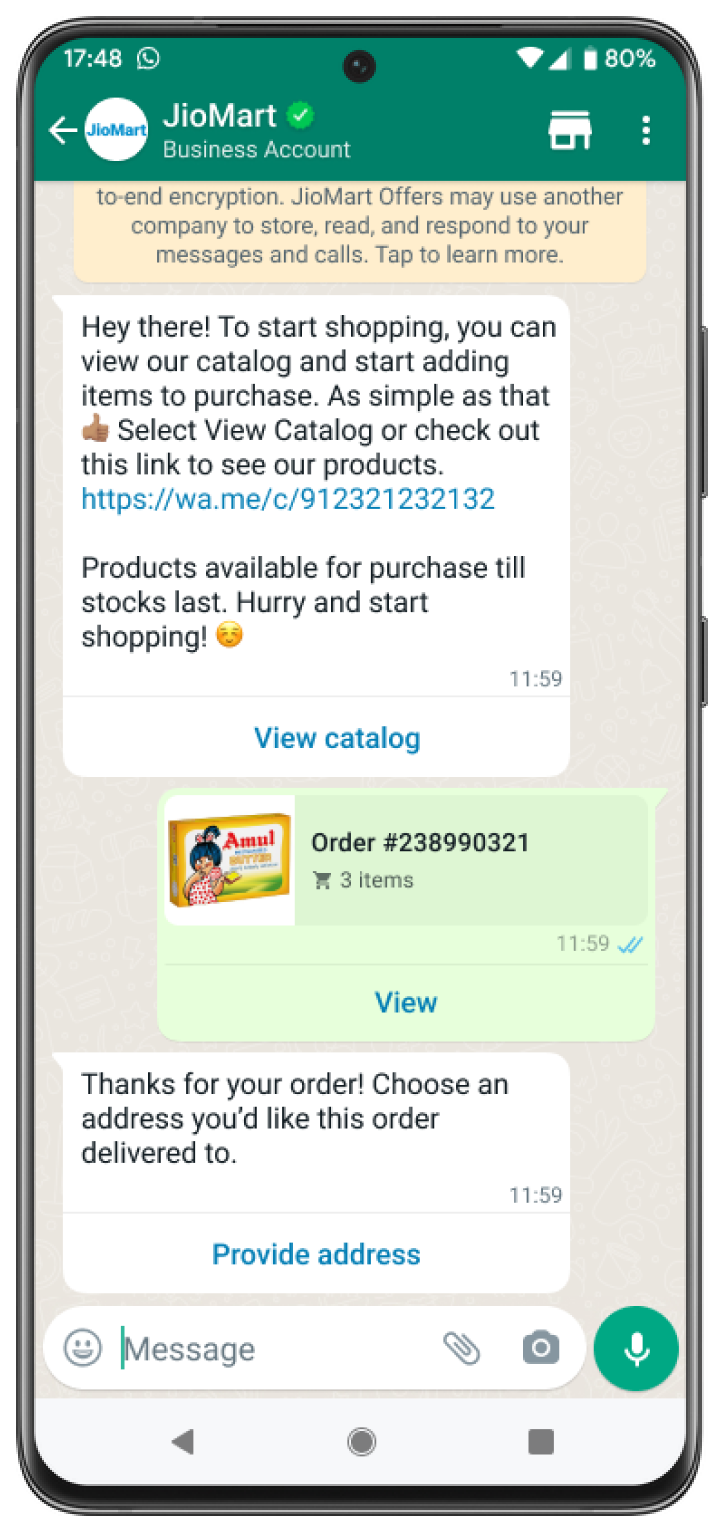
Address messages give your users a simpler way to share the shipping address with the business on WhatsApp.
Address messages are interactive messages that contain the 4 main parts: header, body, footer, and action. Inside the action component business specifies the name “address_message” and relevant parameters.
Currently address messages are supported in the following two countries: India and Singapore. Below table outlines which fields are supported in which country specifically.
| Field Name | Display Label | Input Type | Supported Countries | Limitations |
|---|---|---|---|---|
| name | Name | text | India, Singapore | None |
| phone_number | Phone Number | tel | India, Singapore | Valid phone numbers only |
| in_pin_code | Pin Code | text | India | Max length: 6 |
| sg_post_code | Post Code | number | Singapore | Max length: 6 |
| house_number | Flat/House Number | text | India | None |
| floor_number | Floor Number | text | India | None |
| tower_number | Tower Number | text | India | None |
| building_name | Building/Apartment Name | text | India | None |
| address | Address | text | India, Singapore | None |
| landmark_area | Landmark/Area | text | India | None |
| unit_number | Unit number | text | Singapore | None |
| city | City | text | India, Singapore | None |
| state | State | text | India | None |
Sample API call
curl -X  POST \
'https://graph.facebook.com/v15.0/FROM_PHONE_NUMBER_ID/messages' \
-H 'Authorization: Bearer ACCESS_TOKEN' \
-H 'Content-Type: application/json' \
-d '{
          "messaging_product": "whatsapp",
          "recipient_type": "individual",
          "to": "PHONE_NUMBER",
          "type": "interactive",
          "interactive": {
              "type": "address_message",
              "body": {
                   "text": "Thanks for your order! Tell us what address you’d like this order delivered to."
              },
              "action": {
                   "name": "address_message",
                   "parameters": {
                      "country" :"COUNTRY_ISO_CODE"
                   }
              }
          }
    }'
This is a sample API call for the address message. The country attribute is a mandatory field in the action parameters. If it is not included, there will be a validation error.
Error Handling
If the area code of the phone number for the given country is not correct, businesses will be unable to request the address message from the recipient. For example, businesses will be unable to request an address message from a recipient that has the country as “Singapore” but has a phone number with an area code of "91".
Address messages will not allow simultaneous passing of conflicting fields. For example, you cannot pass in sg_post_code when country is set to “IN”.
Once the address message is sent, the business waits for the user to fill in the address and send it back. The user entered address is shared through the webhook registered in the setup process.
Address Message Steps
The steps involved in an Address Message are the following:
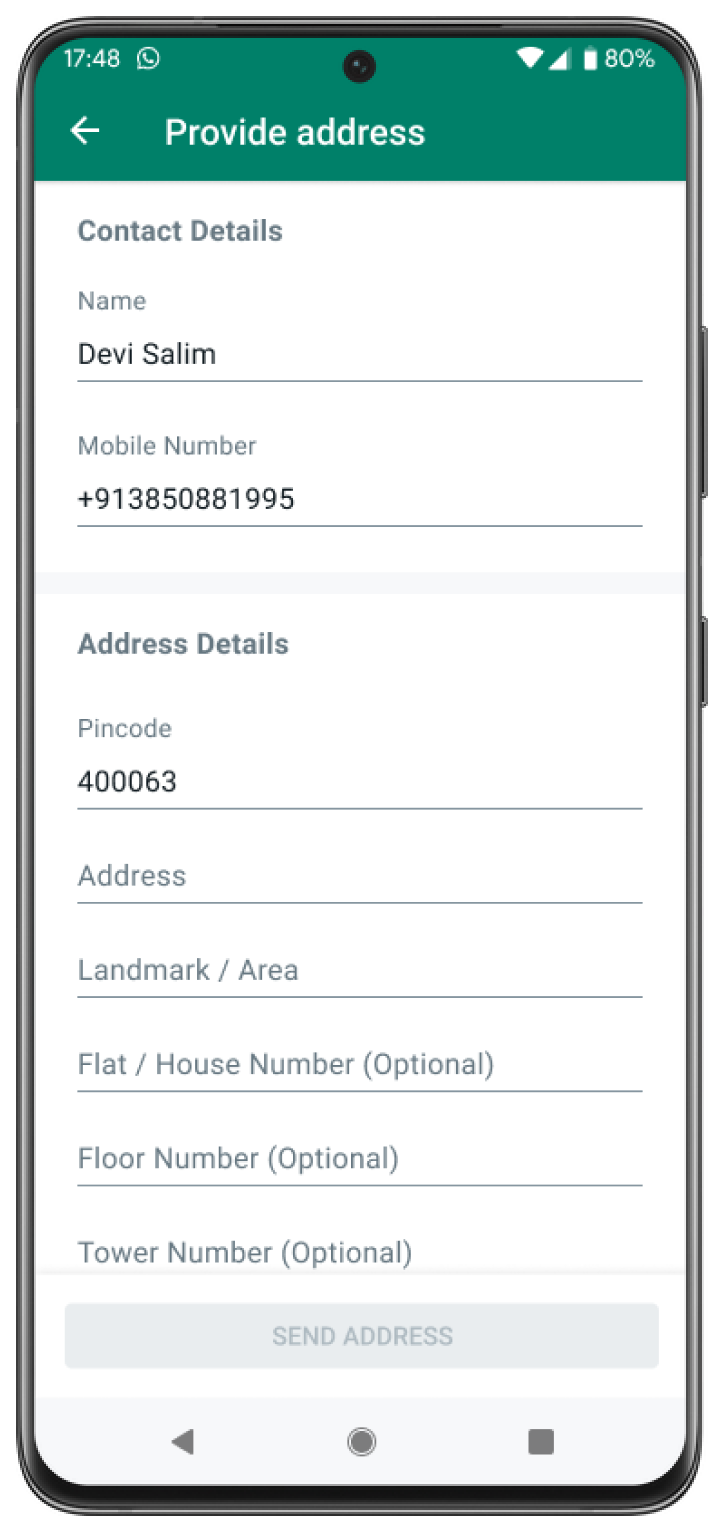
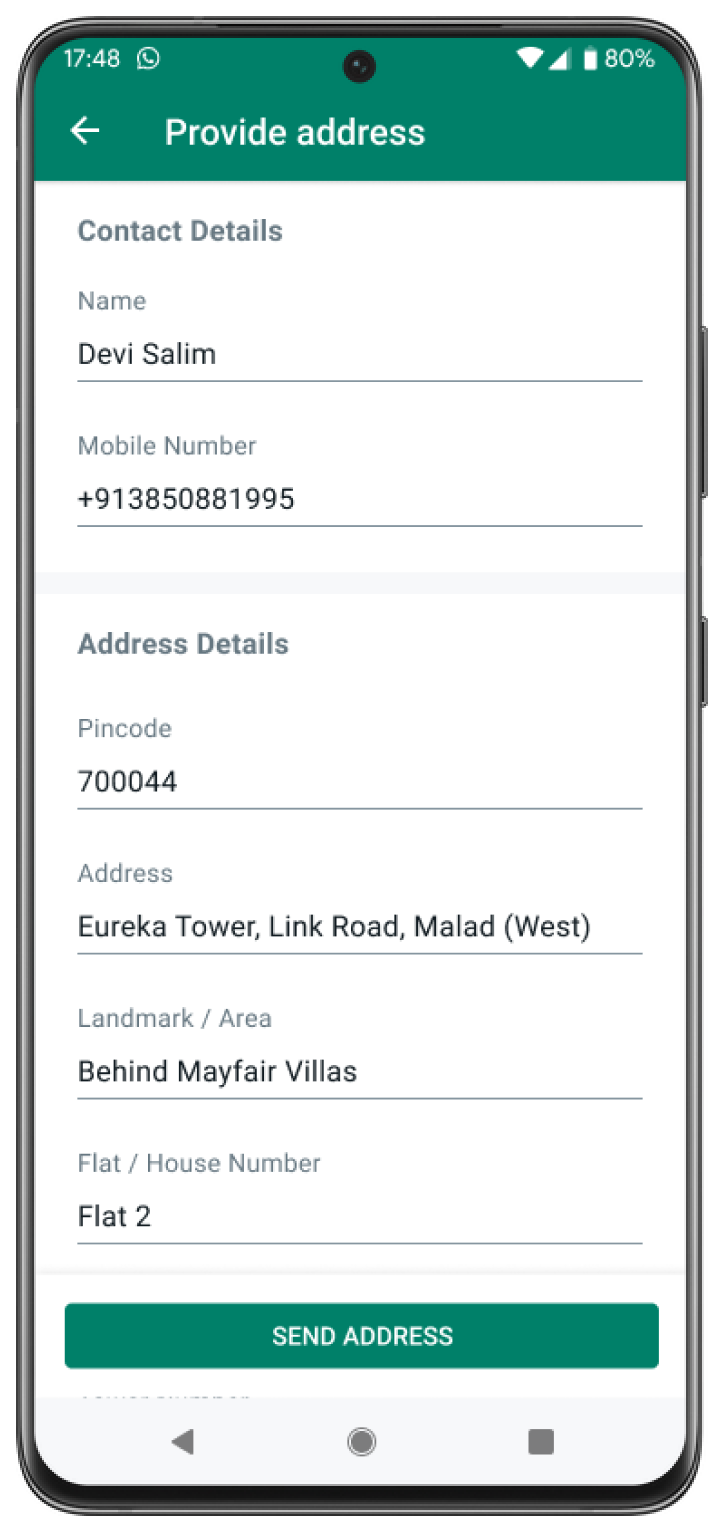
- Business sends an address message with the action name address_message to the user
- User interacts with the message by clicking on the CTA, which brings up an Address Message screen. The user fills out their address and submits the form
- After the address message form is submitted by the user, the partner receives a webhook notification, which contains the details of the address submitted by the user
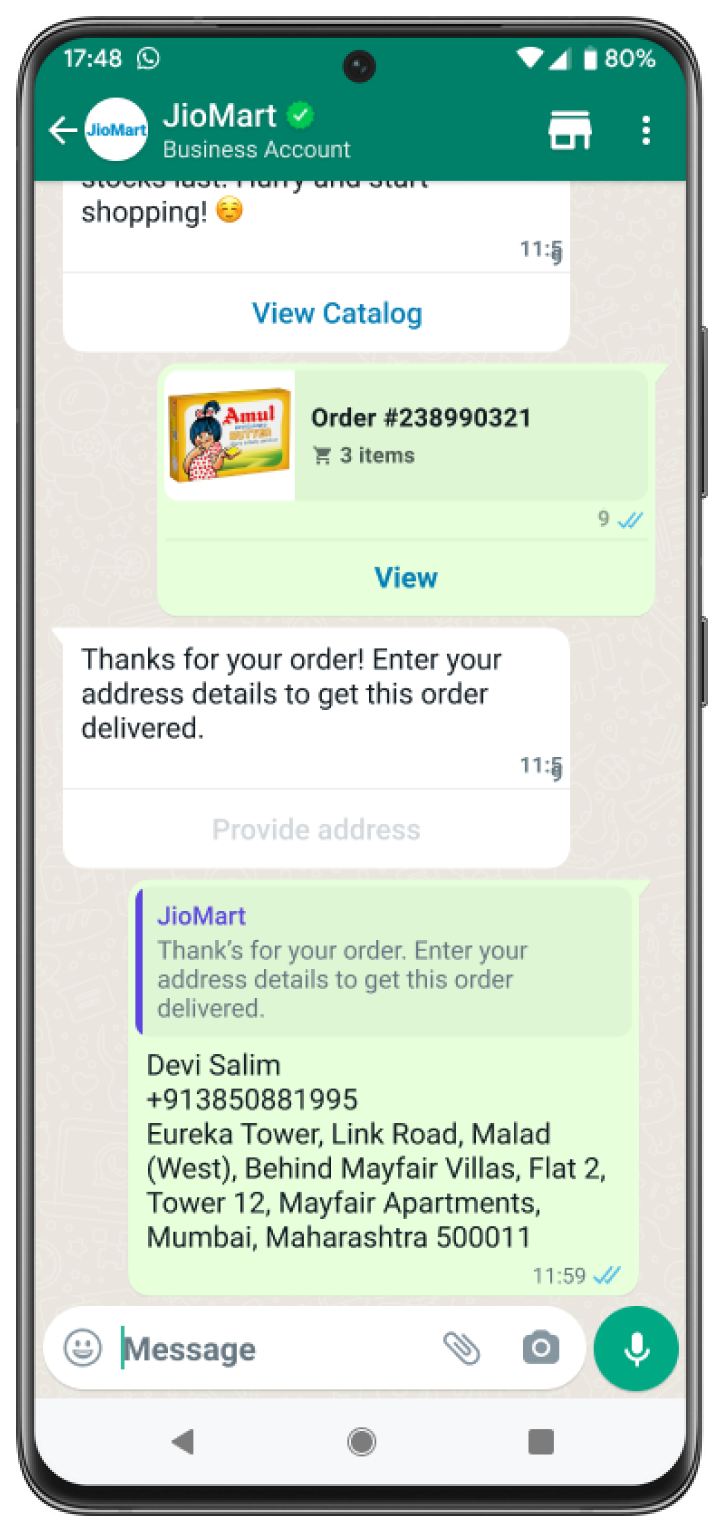
Sample India Address Message
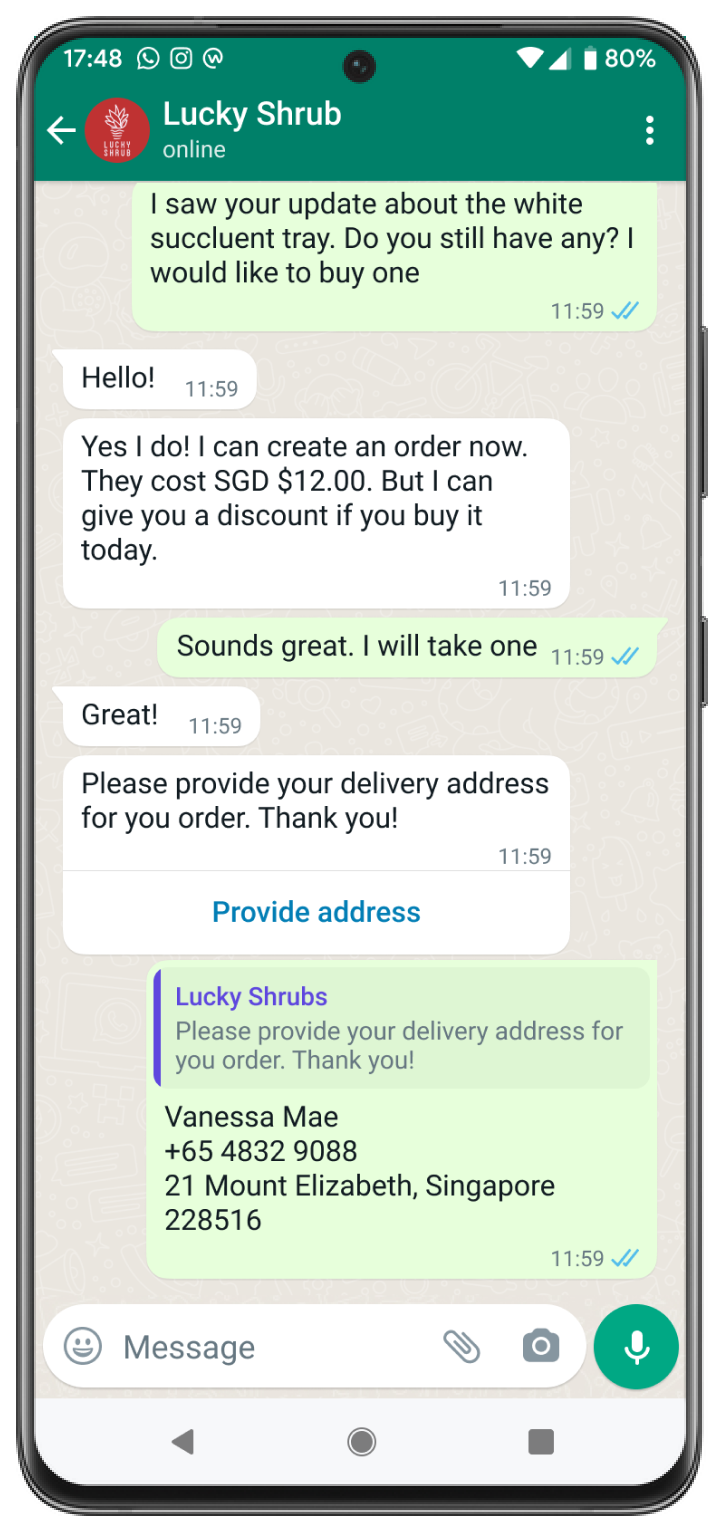
Sample Singapore Address Message
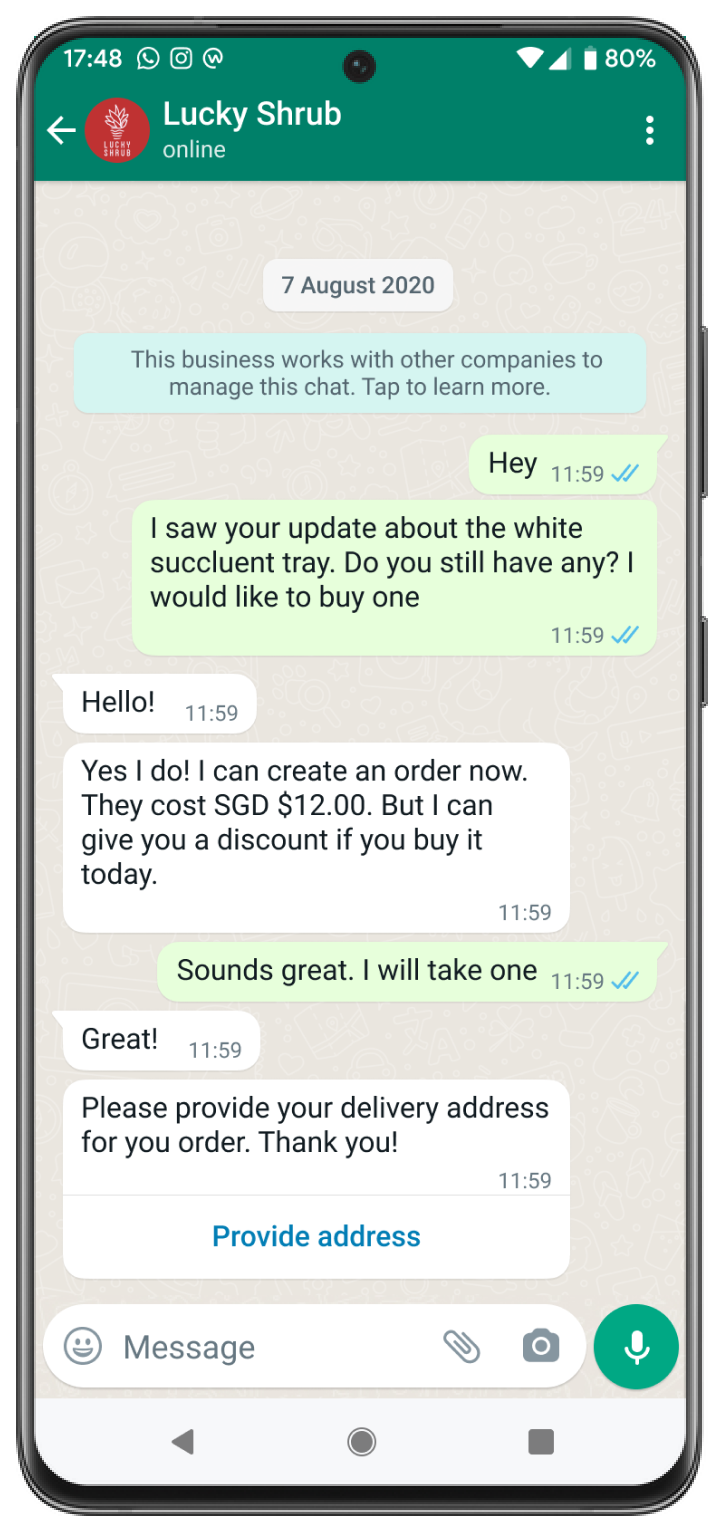
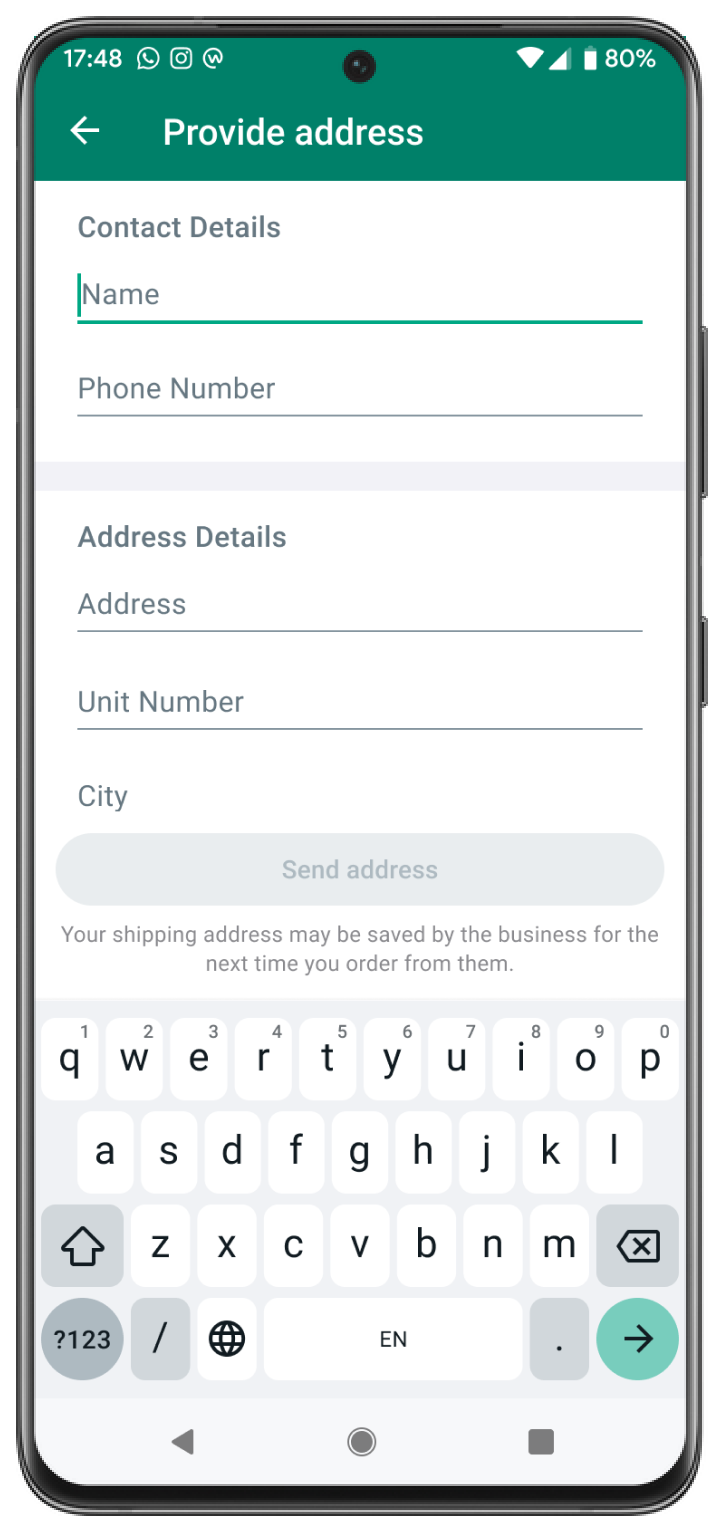
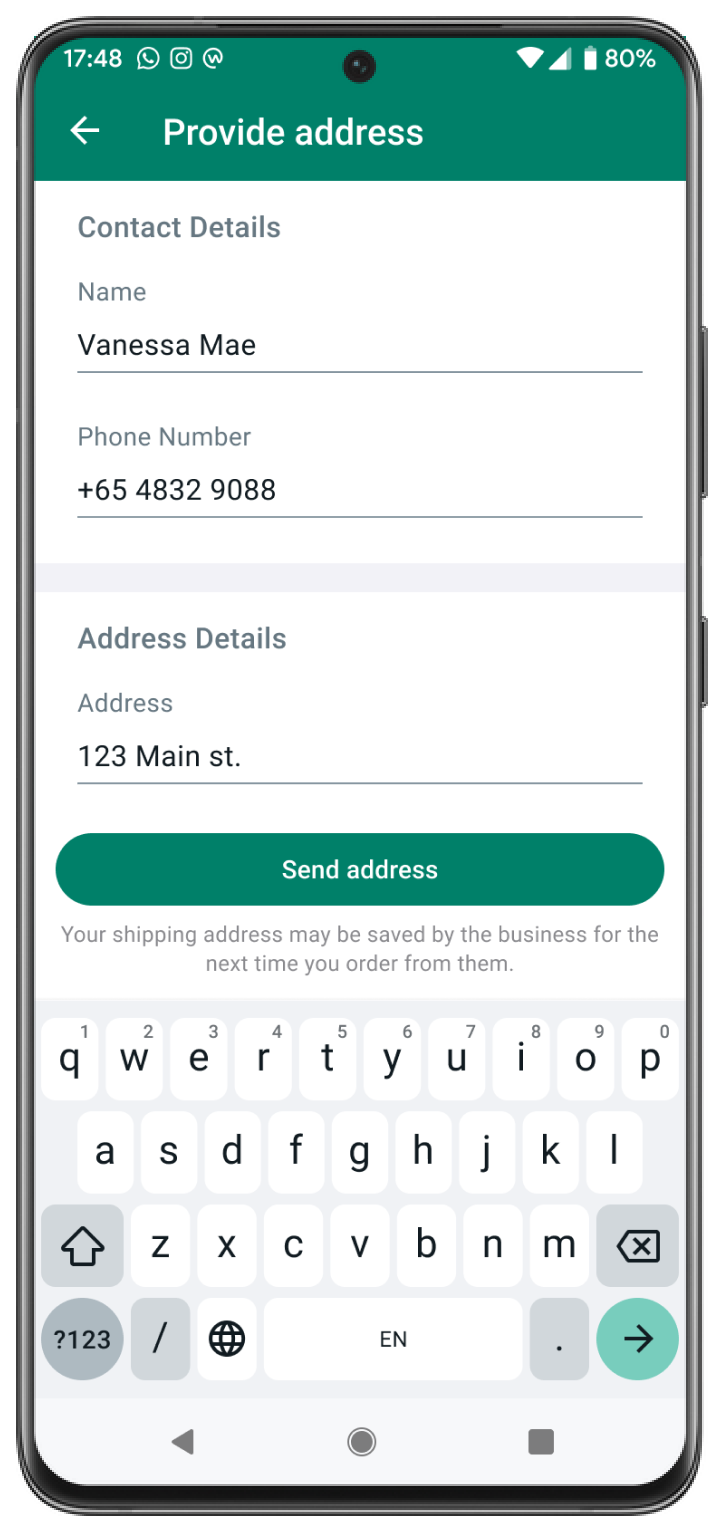
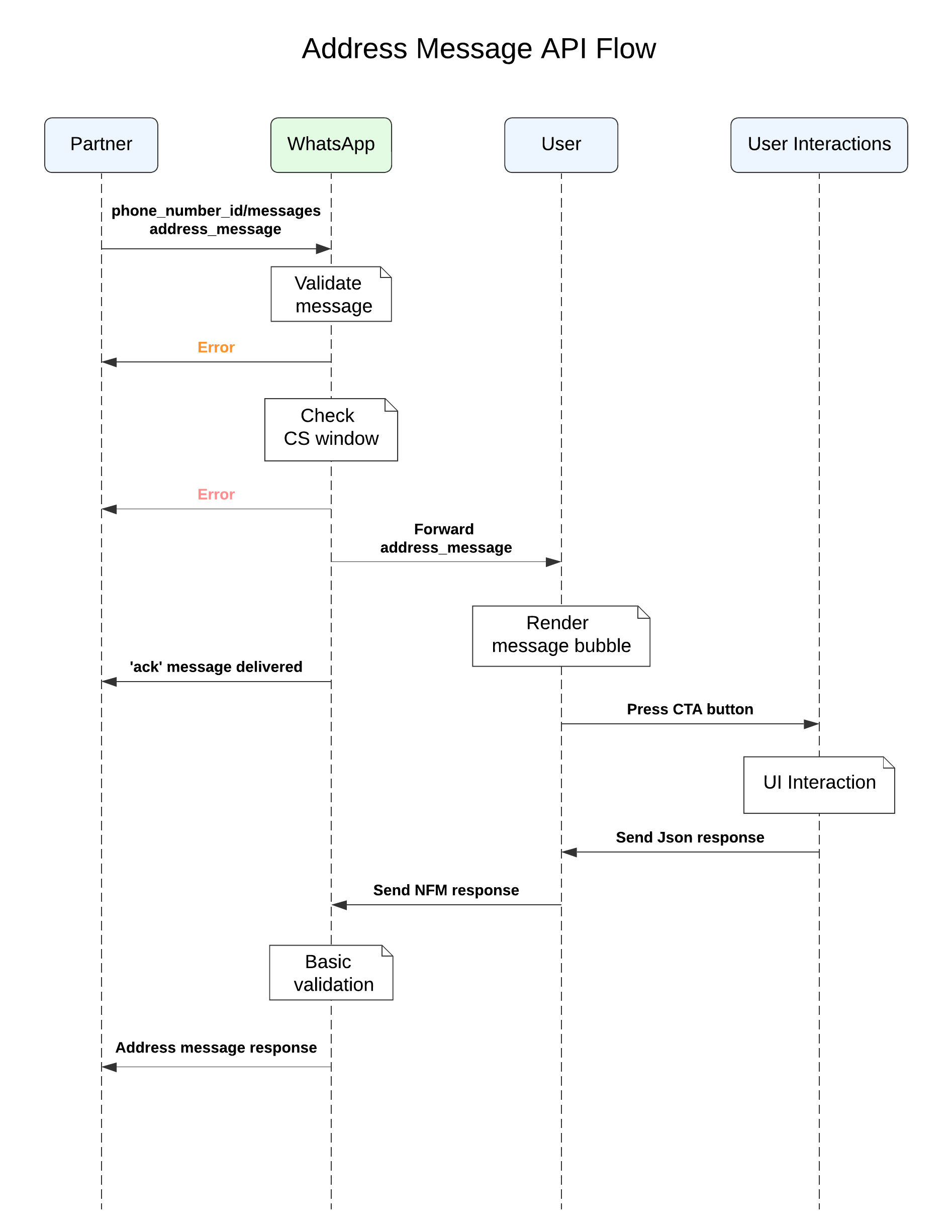
The following sequence diagram shows a typical integration flow for an address message.
Additional Action parameters
The business can pass additional attributes such as values, validation_errors, or saved_addresses as part of the interactive action parameters. You can find information on each of their usage below.
| Action Parameter | Usage |
|---|---|
| values | Businesses prefill this for address fields (eg. prefilling the city address field with “Singapore”) |
| saved_addresses | For businesses, they can pass in saved addresses previously associated with the user. For users, they are presented with the option to choose the saved address instead of manually filling it in |
| validation_errors | Businesses can throw errors in the address fields and WhatsApp will prevent the user from submitting the address until the issue(s) are/is resolved. |
Send Address Message to a user
curl -X  POST \
'https://graph.facebook.com/v15.0/FROM_PHONE_NUMBER_ID/messages' \
-H 'Authorization: Bearer ACCESS_TOKEN' \
-H 'Content-Type: application/json' \
-d ' {
            "messaging_product": "whatsapp",
            "recipient_type": "individual",
            "to": "PHONE_NUMBER",
            "type": "interactive",
            "interactive": {
                 "type": "address_message",
                 "body": {
                       "text": "Thanks for your order! Tell us what address you’d like this order delivered
                        to."
                 },
                "action": {
                      "name": "address_message",
                      "parameters": "JSON Payload"
                 }
            }
     }'
Make a POST call to /PHONE_NUMBER_ID/messages using the WhatsApp API to send an end-to-end encrypted address message to the user:
India
curl -X  POST \
'https://graph.facebook.com/v15.0/FROM_PHONE_NUMBER_ID/messages' \
-H 'Authorization: Bearer ACCESS_TOKEN' \
-H 'Content-Type: application/json' \
-d '{
      "messaging_product": "whatsapp",
      "recipient_type": "individual",
      "to": "+91xxxxxxxxxx",
      "type": "interactive",
      "interactive": {
        "type": "address_message",
        "body": {
          "text": "Thanks for your order! Tell us what address you’d like this order delivered to."
        },
        "action": {
          "name": "address_message",
          "parameters": {
              "country": "IN",
              "values": {
                 "name": "CUSTOMER_NAME",
                 "phone_number": "+91xxxxxxxxxx"
              }
           }
        }
      }
   }'
Singapore
curl -X  POST \
'https://graph.facebook.com/v15.0/FROM_PHONE_NUMBER_ID/messages' \
-H 'Authorization: Bearer ACCESS_TOKEN' \
-H 'Content-Type: application/json' \
-d '{
      "messaging_product": "whatsapp",
      "recipient_type": "individual",
      "to": "+65xxxxxxxxxx",
      "type": "interactive",
      "interactive": {
        "type": "address_message",
        "body": {
          "text": "Thanks for your order! Tell us what address you’d like this order delivered to."
        },
        "action": {
          "name": "address_message",
          "parameters": {
              "country": "SG",
              "values": {
                  "name": "CUSTOMER_NAME",
                  "phone_number": "+65xxxxxxxxxx"
              }
           }
        }
      }
   }'
To send an address message without any saved addresses, WhatsApp will prompt the user or business with an address form to enter a new address.
India
curl -X  POST \
'https://graph.facebook.com/v15.0/FROM_PHONE_NUMBER_ID/messages' \
-H 'Authorization: Bearer ACCESS_TOKEN' \
-H 'Content-Type: application/json' \
-d
'{
  "messaging_product": "whatsapp",
  "recipient_type": "individual",
  "to": "91xxxxxxxxxx",
  "type": "interactive",
  "interactive": {
    "type": "address_message",
    "body": {
      "text": "Thanks for your order! Tell us what address you’d like this order delivered to."
    },
    "action": {
      "name": "address_message",
      "parameters": {
          "country": "IN",
          "saved_addresses": [
             {
                 "id": "address1",
                 "value": {
                    "name": "CUSTOMER_NAME",
                    "phone_number": "+91xxxxxxxxxx",
                    "in_pin_code": "400063",
                    "floor_number": "8",
                    "building_name": "",
                    "address": "Wing A, Cello Triumph,IB Patel Rd",
                    "landmark_area": "Goregaon",
                    "city": "Mumbai"
                 }
             }
          ]
       }
    }
  }
}'
Singapore
curl -X  POST \
'https://graph.facebook.com/v15.0/FROM_PHONE_NUMBER_ID/messages' \
-H 'Authorization: Bearer ACCESS_TOKEN' \
-H 'Content-Type: application/json' \
-d
'{
  "messaging_product": "whatsapp",
  "recipient_type": "individual",
  "to": "+65xxxxxxxxxx",
  "type": "interactive",
  "interactive": {
    "type": "address_message",
    "body": {
      "text": "Thanks for your order! Tell us what address you’d like this order delivered to."
    },
    "action": {
      "name": "address_message",
      "parameters": {
         "country": "SG",
         "values": {
             "name": "CUSTOMER_NAME",
             "phone_number": "+65xxxxxxxxxx"
         },
         "saved_addresses": [
            {
                "id": "address1",
                "value": {
                   "name": "CUSTOMER_NAME",
                   "phone_number": "+65xxxxxxxxxx",
                   "sg_post_code": "018937",
                   "address": "9 Straits View, Marina One West Tower",
                   "unit_number": "Suite 29-00",
                   "city": "Singapore"
                }
            }
         ]
      }
    }
  }
}'
To send an address message with saved addresses, WhatsApp will prompt the user or business with an option to select among the saved addresses or add an address option. Users can ignore the saved address and enter a new address.
Check Your Response
{
  "messaging_product": "whatsapp",
  "contacts": [{
      "input": "PHONE_NUMBER",
      "wa_id": "WHATSAPP_ID",
    }]
  "messages": [{
      "id": "wamid.ID",
    }]
}
A successful response includes a messages object with an ID for the newly created message.
An unsuccessful response contains an error message.
Send an Address Message with Validation Errors
India
curl -X  POST \
'https://graph.facebook.com/v15.0/FROM_PHONE_NUMBER_ID/messages' \
-H 'Authorization: Bearer ACCESS_TOKEN' \
-H 'Content-Type: application/json' \
-d
'{
  "messaging_product": "whatsapp",
  "recipient_type": "individual",
  "to": "91xxxxxxxxxx",
  "type": "interactive",
  "interactive": {
    "type": "address_message",
    "body": {
      "text": "Thanks for your order! Tell us what address you’d like this order delivered to."
    },
    "action": {
      "name": "address_message",
      "parameters": {
          "country": "IN",
          "values": {
             "name": "CUSTOMER_NAME",
             "phone_number": "+91xxxxxxxxxx",
             "in_pin_code": "666666",
             "address": "Some other location",
             "city": "Delhi"
          },
          "validation_errors": {
             "in_pin_code": "We could not locate this pin code."
          }
       }
    }
  }
}'
Singapore
curl -X  POST \
'https://graph.facebook.com/v15.0/FROM_PHONE_NUMBER_ID/messages' \
-H 'Authorization: Bearer ACCESS_TOKEN' \
-H 'Content-Type: application/json' \
-d
'{
  "messaging_product": "whatsapp",
  "recipient_type": "individual",
  "to": "12065550107",
  "type": "interactive",
  "interactive": {
    "type": "address_message",
    "body": {
      "text": "Thanks for your order! Tell us what address you’d like this order delivered to."
    },
    "action": {
      "name": "address_message",
      "parameters": {
           "country": "SG",
           "values": {
              "name": "CUSTOMER_NAME",
              "phone_number": "+65xxxxxxxxxx",
              "sg_post_code": "666666",
              "address": "Some other location",
              "city": "Singapore"
           },
           "validation_errors": {
              "sg_post_code": "We could not locate this pin code."
           }
        }
     }
  }
}'
An address message should be re-sent to the user in the case of a validation error on the business server. The business should send back the set of values previously entered by the user, along with the respective validation errors for each invalid field, as shown in the sample payloads on the right side.
Receive Notifications for Address Submissions
{
    "messages": [
        {
           "id": "gBGGFlAwCWFvAgmrzrKijase8yA",
           "from": "PHONE_NUMBER",
           "Interactive": {
               "type":  "nfm_reply",
               "action":  "address_message",
               "nfm_reply": {
                   "name": "address_message",
                    "response_json": “<response_json from client>”,
                    "body": “<body text from client>”,
            }
           "timestamp": "1670394125",
           "type": "interactive"
        }
    ]
}
Businesses will receive address submission notifications through webhooks, such as the one shown on the right side.
The webhook notification has the following values.
| Field Name | Type | Description |
|---|---|---|
| interactive | Object | Holds the response from the client |
| type | String | Would be nfm_reply indicating it is a Native Flow Response (NFM) from the client |
| nfm_reply | Object | Holds the data received from the client |
| response_json | String | The values of the address fields filled by the user in JSON format that are always present |
| body (Optional) | String | Body text from client, what the user sees |
| name (Optional) | String | Would be address_message indicating the type of NFM action response from the client |
{
   "messages": [
      {
          "context": {
      "from": "FROM_PHONE_NUMBER_ID",
      "id": "wamid.HBgLMTIwNjU1NTAxMDcVAgARGBI3NjNFN0U5QzMzNDlCQjY0M0QA"
           },
          "from": "PHONE_NUMBER",
         "id": "wamid.HBgLMTIwNjU1NTAxMDcVAgASGCA5RDhBNENEMEQ3RENEOEEzMEI0RUExRDczN0I1NThFQwA=",
         "timestamp": "1671498855",
         "type": "interactive",
         "interactive": {
     "type": "nfm_reply",
    "nfm_reply": {
          "response_json": "{\"saved_address_id\":\"address1\",\"values\":{\"in_pin_code\":\"400063\",\"building_name\":\"\",\"landmark_area\":\"Goregaon\",\"address\":\"Wing A, Cello Triumph, IB Patel Rd\",\"city\":\"Mumbai\",\"name\":\"CUSTOMER_NAME\",\"phone_number\":\"+91xxxxxxxxxx\",\"floor_number\":\"8\"}}",
                    "body": "CUSTOMER_NAME\n +91xxxxxxxxxx\n 400063, Goregaon, Wing A, Cello Triumph,IB Patel Rd, Mumbai, 8",
                    "name": "address_message"
                }
            }
        }
    ]
}
An address message reply as an NFM response type for an India address message request is show on the right side.
Feature Not Supported
{
  "statuses": [
    {
      "errors": [
        {
          "code": 1026,
          "href": "https://developers.facebook.com/docs/whatsapp/api/errors/",
          "title": "Receiver Incapable"
        }
      ],
      "id": "gBGGFlAwCWFvAgkyHMGKnRu4JeA",
      "message": {
        "recipient_id": "+91xxxxxxxxxx"
      },
      "recipient_id": "91xxxxxxxxxx",
      "status": "failed",
      "timestamp": "1670394125",
      "type": "message"
    }
  ]
}
In the case where the client does not support address_message, messages are silently dropped and an error message is sent back to the business in a webhook. The webhook notification that would be sent back is shown on the right side:
Delivery Sequence of Multiple Messages
When sending a series of messages, the order in which messages are delivered is not guaranteed to match the order of your API requests. If you need to ensure the sequence of message delivery, confirm receipt of a delivered status in a messages webhook before sending the next message in your message sequence.
Sending Template Messages
WhatsApp message templates are specific message formats that businesses use to send out notifications or customer care messages to people that have opted in to notifications. Messages can include appointment reminders, shipping information, issue resolution or payment updates.
Before sending a template message, you need to create a template. If your account is not verified yet, you can use one of our pre-approved templates.
Currently, you can send the following template types:
- Text-based message templates
- Media-based message templates
- Interactive message templates
- Location-based message templates
- Authentication templates with one-time password buttons
- Multi-Product Message templates
All API calls mentioned in this guide must be authenticated with an access token. Developers can authenticate their API calls with the access token generated in the App Dashboard > WhatsApp > API Setup panel. Business Solution Providers (BSPs) must authenticate themselves with an access token with the whatsapp_business_messaging permission.
Pacing
Newly created or unpaused marketing templates are subject to template pacing. See [Template Pacing.]
Text-Based Message Templates
Sample request:
curl -X  POST \
 'https://graph.facebook.com/v17.0/FROM_PHONE_NUMBER_ID/messages' \
 -H 'Authorization: Bearer ACCESS_TOKEN' \
 -H 'Content-Type: application/json' \
 -d '{
  "messaging_product": "whatsapp",
  "recipient_type": "individual",
  "to": "PHONE_NUMBER",
  "type": "template",
  "template": {
    "name": "TEMPLATE_NAME",
    "language": {
      "code": "LANGUAGE_AND_LOCALE_CODE"
    },
    "components": [
      {
        "type": "body",
        "parameters": [
          {
            "type": "text",
            "text": "text-string"
          },
          {
            "type": "currency",
            "currency": {
              "fallback_value": "VALUE",
              "code": "USD",
              "amount_1000": NUMBER
            }
          },
          {
            "type": "date_time",
            "date_time": {
              "fallback_value": "DATE"
            }
          }
        ]
      }
    ]
  }
}'
To send a text-based message template, make a POST call to /PHONE_NUMBER_ID/messages and attach a message object with type=template. Then, add a template object.
Example:
{
  "messaging_product": "whatsapp",
  "contacts": [{
      "input": "PHONE_NUMBER",
      "wa_id": "WHATSAPP_ID",
    }]
  "messages": [{
      "id": "wamid.ID",
    }]
}
A successful response includes an object with an identifier prefixed with wamid. Use the ID listed after wamid to track your message status.
Media-Based Message Templates
Sample request:
curl -X  POST \
 'https://graph.facebook.com/v17.0/FROM_PHONE_NUMBER_ID/messages' \
 -H 'Authorization: Bearer ACCESS_TOKEN' \
 -H 'Content-Type: application/json' \
 -d '{
  "messaging_product": "whatsapp",
  "recipient_type": "individual",
  "to": "PHONE_NUMBER",
  "type": "template",
  "template": {
    "name": "TEMPLATE_NAME",
    "language": {
      "code": "LANGUAGE_AND_LOCALE_CODE"
    },
    "components": [
      {
        "type": "header",
        "parameters": [
          {
            "type": "image",
            "image": {
              "link": "https://URL"
            }
          }
        ]
      },
      {
        "type": "body",
        "parameters": [
          {
            "type": "text",
            "text": "TEXT-STRING"
          },
          {
            "type": "currency",
            "currency": {
              "fallback_value": "VALUE",
              "code": "USD",
              "amount_1000": NUMBER
            }
          },
          {
            "type": "date_time",
            "date_time": {
              "fallback_value": "MONTH DAY, YEAR"
            }
          }
        ]
      }
    ]
  }
}'
To send a media-based message template, make a POST call to /PHONE_NUMBER_ID/messages and attach a message object with type=template. Then, add a template object. Supports Media HTTP Caching.
Use the POST WhatsApp Business Phone Number > Messages endpoint to send a media-based template message. Set the type property to template and use the template property to define your template object and its media object.
When defining your media object, you can either upload your media asset to our servers and use its media ID (using the id property), or host the asset on your server and use its URL (using the link property). If using link, your asset must be on a publicly accessible server or the message will fail to send.
Media assets can be cached. See Media HTTP Caching.
Example:
{
  "messaging_product": "whatsapp",
  "contacts": [{
      "input": "PHONE_NUMBER",
      "wa_id": "WHATSAPP_ID",
    }]
  "messages": [{
      "id": "wamid.ID",
    }]
}
A successful response includes an object with an identifier prefixed with wamid. Use the ID listed after wamid to track your message status.
Interactive Message Templates
Sample request:
curl -X  POST \
 'https://graph.facebook.com/v17.0/FROM_PHONE_NUMBER_ID/messages' \
 -H 'Authorization: Bearer ACCESS_TOKEN' \
 -H 'Content-Type: application/json' \
 -d '{
  "messaging_product": "whatsapp",
  "recipient_type": "individual",
  "to": "PHONE_NUMBER",
  "type": "template",
  "template": {
    "name": "TEMPLATE_NAME",
    "language": {
      "code": "LANGUAGE_AND_LOCALE_CODE"
    },
    "components": [
      {
        "type": "header",
        "parameters": [
          {
            "type": "image",
            "image": {
              "link": "http(s)://URL"
            }
          }
        ]
      },
      {
        "type": "body",
        "parameters": [
          {
            "type": "text",
            "text": "TEXT_STRING"
          },
          {
            "type": "currency",
            "currency": {
              "fallback_value": "VALUE",
              "code": "USD",
              "amount_1000": NUMBER
            }
          },
          {
            "type": "date_time",
            "date_time": {
              "fallback_value": "MONTH DAY, YEAR"
            }
          }
        ]
      },
      {
        "type": "button",
        "sub_type": "quick_reply",
        "index": "0",
        "parameters": [
          {
            "type": "payload",
            "payload": "PAYLOAD"
          }
        ]
      },
      {
        "type": "button",
        "sub_type": "quick_reply",
        "index": "1",
        "parameters": [
          {
            "type": "payload",
            "payload": "PAYLOAD"
          }
        ]
      }
    ]
  }
}'
Interactive message templates expand the content you can send recipients beyond the standard message template and media messages template types to include interactive buttons using the components object. There are two types of predefined buttons:
- Call-to-Action — Allows your customer to call a phone number and visit a website.
- Quick Reply — Allows your customer to return a simple text message.
These buttons can be attached to text messages or media messages. Once your interactive message templates have been created and approved, you can use them in notification messages as well as customer service/care messages.
To send an interactive message template, make a POST call to /PHONE_NUMBER_ID/messages and attach a message object with type=template. Then, add a template object with your chosen button.
Example:
{
  "messaging_product": "whatsapp",
  "contacts": [{
      "input": "PHONE_NUMBER",
      "wa_id": "WHATSAPP_ID",
    }]
  "messages": [{
      "id": "wamid.ID",
    }]
}
A successful response includes an object with an identifier prefixed with wamid. Use the ID listed after wamid to track your message status.
Location-based Message Templates
To send a template that uses a location header your request must include a location header object.
Syntax
{
  "type": "header",
  "parameters": [
    {
      "type": "location",
      "location": {
        "latitude": "<LATITUDE>",
        "longitude": "<LONGITUDE>",
        "name": "<NAME>",
        "address": "<ADDRESS>"
      }
    }
  ]
}
Properties
| Placeholder | Description | Sample Value |
|---|---|---|
| <ADDRESS< | Address that will appear after the <NAME< value, below the generic map at the top of the message. | 1 Hacker Way, Menlo Park, CA 94025 |
| <LATITUDE< | Location latitude | 37.483307 |
| <LONGITUDE< | Location longitude. | 122.148981 |
| <NAME< | Text that will appear immediately below the generic map at the top of the message. | Pablo Morales |
Example Request
curl -L 'https://graph.facebook.com/v16.0/106540352242922/messages' \
-H 'Content-Type: application/json' \
-H 'Authorization: Bearer EAAJB...' \
-d '
{
  "messaging_product": "whatsapp",
  "recipient_type": "individual",
  "to": "12245554792",
  "type": "template",
  "template": {
    "name": "order_delivery_update",
    "language": {
      "code": "en_US"
    },
    "components": [
      {
        "type": "header",
        "parameters": [
          {
            "type": "location",
            "location": {
              "latitude": "37.483307",
              "longitude": "122.148981",
              "name": "Pablo Morales",
              "address": "1 Hacker Way, Menlo Park, CA 94025"
            }
          }
        ]
      },
      {
        "type": "body",
        "parameters": [
          {
            "type": "text",
            "text": "Pablo"
          },
          {
            "type": "text",
            "text": "566701"
          }
        ]
      }
    ]
  }
}'
This is an example request to send an existing template that uses the following components:
- a location header
- a text body with a variable
- a footer
- a quick reply button
Authentication Template Messages With One-Time Password Buttons
See Sending Authentication Templates with One-Time Password Buttons.
Delivery Sequence of Multiple Messages
When sending a series of messages, the order in which messages are delivered is not guaranteed to match the order of your API requests. If you need to ensure the sequence of message delivery, confirm receipt of a delivered status in a messages webhook before sending the next message in your message sequence.
Sending Authentication Templates with One-Time Password Buttons
This document explains how to send approved authentication templates with one-time password buttons.
Request
Use the WhatsApp Business Phone Number > Messages endpoint to send an authentication template message with a one-time password button.
Syntax
POST /<WHATSAPP_BUSINESS_PHONE_NUMBER_ID>/messages
Post Body
{
  "messaging_product": "whatsapp",
  "recipient_type": "individual",
  "to": "<CUSTOMER_PHONE_NUMBER>",
  "type": "template",
  "template": {
    "name": "<TEMPLATE_NAME>",
    "language": {
      "code": "<TEMPLATE_LANGUAGE_CODE>"
    },
    "components": [
      {
        "type": "body",
        "parameters": [
          {
            "type": "text",
            "text": "<ONE-TIME PASSWORD>"
          }
        ]
      },
      {
        "type": "button",
        "sub_type": "url",
        "index": "0",
        "parameters": [
          {
            "type": "text",
            "text": "<ONE-TIME PASSWORD>"
          }
        ]
      }
    ]
  }
}
Properties
| Placeholder | Description | Sample Value |
|---|---|---|
| <CUSTOMER_PHONE_NUMBER> | The customer's WhatsApp phone number. | 12015553931 |
| <ONE-TIME PASSWORD> | The one-time password or verification code to be delivered to the customer. Note that this value must appear twice in the payload. |
J$FpnYnP |
| <TEMPLATE_LANGUAGE_CODE> | The template's language and locale code. | en_US |
| <TEMPLATE_NAME> | The template's name. | verification_code |
Response
{
  "messaging_product": "whatsapp",
  "contacts": [
    {
      "input": "<INPUT>",
      "wa_id": "<WA_ID>"
    }
  ],
  "messages": [
    {
      "id": "<ID>"
    }
  ]
}
Upon success, the API will respond with:
Response Contents
| Placeholder | Description | Sample Value |
|---|---|---|
| <ID> | WhatsApp message ID. | wamid.HBgLMTY1MDM4Nzk 0MzkVAgARGBJDOEI3ODgxNzQzMjJB QTdEQTcA |
| <INPUT> | Customer WhatsApp phone number (same as customer ID). | 12015553931 |
| <WA_ID> | Customer ID (same as customer WhatsApp phone number). | 12015553931 |
Example
Example Request
curl -L 'https://graph.facebook.com/v17.0/105954558954427/messages' \
-H 'Content-Type: application/json' \
-H 'Authorization: Bearer EAAJB...' \
-d '{
      "messaging_product": "whatsapp",
      "recipient_type": "individual",
      "to": "12015553931",
      "type": "template",
      "template": {
        "name": "verification_code",
        "language": {
          "code": "en_US"
      },
      "components": [
        {
          "type": "body",
          "parameters": [
            {
              "type": "text",
              "text": "J$FpnYnP"
            }
          ]
        },
        {
          "type": "button",
          "sub_type": "url",
          "index": "0",
          "parameters": [
            {
              "type": "text",
              "text": "J$FpnYnP"
            }
          ]
        }
      ]
    }
  }'
Example Response
{
  "messaging_product": "whatsapp",
  "contacts": [
    {
      "input": "12015553931",
      "wa_id": "12015553931"
    }
  ],
  "messages": [
    {
      "id": "wamid.HBgLMTY1MDM4Nzk0MzkVAgARGBI4Qzc5QkNGNTc5NTMyMDU5QzEA"
    }
  ]
}
Sending Multi-Product Template Messages
This document explains how to send multi-product message (MPM) templates in template messages.
Components
MPM template messages must have:
- a header component (only required if template uses a header variable)
- a body component (only required if template uses a body variable)
- a single MPM button component
Use the MPM button component to define sections and their titles that will appear when the customer taps the View items button, and to designate which products appear in each of those sections.
Request
To send an approved MPM template in a template message, send a POST request to the WhatsApp Business Phone Number > Messages endpoint. Use the POST body to define the contents of the message and to describe any variables to inject into the template itself.
Syntax
POST /<BUSINESS_PHONE_NUMBER_ID>/messages
Post Body
{
  "messaging_product": "whatsapp",
  "recipient_type": "individual",
  "to": "<TO>",
  "type": "template",
  "template": {
    "name": "<NAME>",
    "language": {
      "code": "<CODE>"
    },
    "components": [

      /* Header component required if template uses a header variable */
      {
        "type": "header",
        "parameters": [
          {
            "type": "text",
            "text": "<HEADER_TEXT>"
          }
        ]
      },

      /* Body component required if template uses a body variable */
      {
        "type": "body",
        "parameters": [
          {
            "type": "text",
            "text": "<BODY_TEXT>"
          }
        ]
      },

      /* MPM button component always required */
      {
        "type": "button",
        "sub_type": "mpm",
        "index": 0,
        "parameters": [
          {
            "type": "action",
            "action": {
              "thumbnail_product_retailer_id": "<THUMBNAIL_PRODUCT_RETAILER_ID>",
              "sections": [
                {
                  "title": "<TITLE>",
                  "product_items": [
                    {
                      "product_retailer_id": "<PRODUCT_RETAILER_ID>"
                    },
                    ... // Additional item objects (up to 30)
                  ]
                },
                ... // Add section objects (up to 10)
              ]
            }
          }
        ]
      }
    ]
  }
}
Properties
| Placeholder | Description | Sample Value |
|---|---|---|
| <BODY_TEXT> | Required if template uses variables. String or array of strings. Text to replace body variable(s) defined in the template. |
10OFF |
| <CODE> | Template language and locale code. | en_US |
| <HEADER_TEXT> | Required if template uses a variable. Text to replace header variable defined in the template. |
Pablo |
| <NAME> | Template name. | abandoned_cart |
| <PRODUCT_RETAILER_ID> | SKU number of the item you want to appear in the section. SKU numbers are labeled as Content ID in the Commerce Manager. Supports up to 30 products total, across all sections. |
2lc20305pt |
| <THUMBNAIL_PRODUCT_RETAILER_ID> | Item SKU number. Labeled as Content ID in the Commerce Manager. The thumbnail of this item will be used as the template message's header image. |
2lc20305pt |
| <TITLE> | Section title text. You can define up to 10 sections. Maximum 24 characters. Markdown is not supported. |
Popular Bundles |
| <TO> | Customer phone number. | 16505551234 |
Response
{
  "messaging_product": "whatsapp",
  "contacts": [
    {
      "input": "<INPUT>",
      "wa_id": "<WA_ID>"
    }
  ],
  "messages": [
    {
      "id": "<ID>"
    }
  ]
}
Upon success, the API will respond with:
Response Contents
| Placeholder | Description | Sample Value |
|---|---|---|
| <ID> | WhatsApp message ID. | wamid.HBgLMTY1MDM4Nzk0MzkVAgARG BJDOEI3ODgxNzQzMjJBQTdEQTcA |
| <INPUT> | Customer WhatsApp phone number. | 16505551234 |
| <WA_ID> | Customer WhatsApp ID. | 16505551234 |
Example
Example Request
curl 'https://graph.facebook.com/v17.0/106540352242922/messages' \
-H 'Content-Type: application/json' \
-H 'Authorization: Bearer EAAJB...' \
-d '
{
  "messaging_product": "whatsapp",
  "recipient_type": "individual",
  "to": "16505551234",
  "type": "template",
  "template": {
    "name": "abandoned_cart",
    "language": {
      "code": "en_US"
    },
    "components": [
      {
        "type": "header",
        "parameters": [
          {
            "type": "text",
            "text": "Pablo"
          }
        ]
      },
      {
        "type": "body",
        "parameters": [
          {
            "type": "text",
            "text": "10OFF"
          }
        ]
      },
      {
        "type": "button",
        "sub_type": "mpm",
        "index": 0,
        "parameters": [
          {
            "type": "action",
            "action": {
              "thumbnail_product_retailer_id": "2lc20305pt",
              "sections": [
                {
                  "title": "Popular Bundles",
                  "product_items": [
                    {
                      "product_retailer_id": "2lc20305pt"
                    },
                    {
                      "product_retailer_id": "nseiw1x3ch"
                    }
                  ]
                },
                {
                  "title": "Premium Packages",
                  "product_items": [
                    {
                      "product_retailer_id": "n6k6x0y7oe"
                    }
                  ]
                }
              ]
            }
          }
        ]
      }
    ]
  }
}'
This example sends an approved template named "abandoned_cart" and injects a variable (the customer's first name) into the template header and a discount code into the template body. It also defines two sections ("Popular Bundles" and "Premium Packages") and identifies the products (a total of 3) that should be injected into those sections.
Example Response
{
  "messaging_product": "whatsapp",
  "contacts": [
    {
      "input": "16505551234",
      "wa_id": "16505551234"
    }
  ],
  "messages": [
    {
      "id": "wamid.HBgLMTY1MDM4Nzk0MzkVAgARGBJDOEI3ODgxNzQzMjJBQTdEQTcA"
    }
  ]
}